
How to Create Fast Listing Pages That Buyers Actually Browse
Most agent websites load slowly and lose buyers. Purpose-built listing pages fix that with custom code, optimized images, maps, and structured data.


Buyers judge a home in seconds. If the listing page is still loading, they are already looking at the next one. Most agent websites are built on heavy WordPress themes and plugin stacks. Every extra script slows the page. On a phone the wait is often enough to make someone bounce.
A listing page has one job: give a buyer everything they need to decide on a showing. That includes the photos, the price, the basic facts, the location, and a clear way to contact you. Anything that gets in the way of those five things is costing you attention.
What a good listing page needs to do
A strong listing page puts the essentials first:
- Photo gallery that loads quickly and works with a swipe
- Price, address, beds, baths, and square footage visible immediately
- Map and directions
- Clear way to request a tour or send a message
- Share buttons so the buyer can send the page to a partner
- Structured data so search engines can read the listing
Here is the tour and open house section from a listing page. The map and form sit side by side so buyers can see the location and request a time without leaving the page:
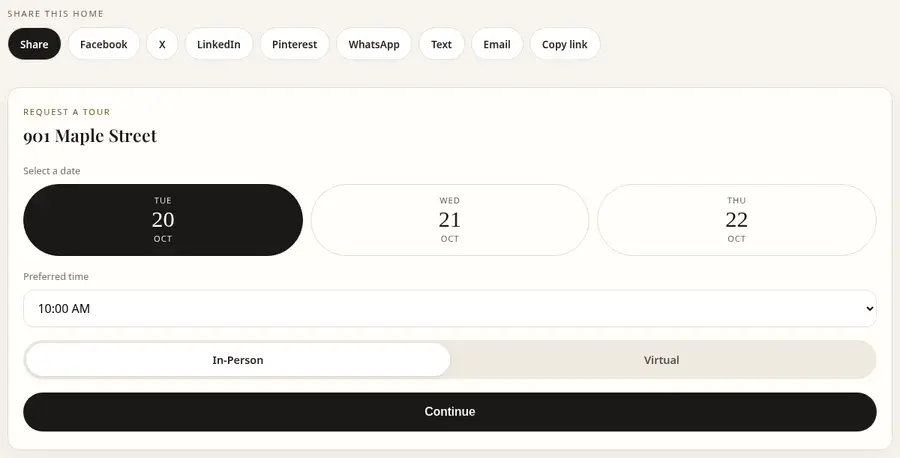
Further up the same page the gallery and key facts load first. Price, address, and the main call to action stay visible without extra clicks. The same pages also power the agent website that lists every property in one place.
The order matters. Buyers who are serious will scroll. Buyers who are still deciding need the price and the photos before they invest more time. Putting the gallery and the key facts above the fold, then the map and the form, matches how most people actually look at a listing.
Why template sites struggle here
Template sites carry theme and plugin weight you do not need for a listing. Map widgets, form builders, gallery plugins, and tracking scripts all add requests. Listing details often live in shortcodes or page builders that do not produce clean structured data.
Property Landing Pages uses its own code built only for listing pages and agent sites. Images are optimized and served in modern formats. The map loads when it is near the viewport. The page stays light on any phone.
That difference shows up in two places. First, more people reach the tour form because the page did not stall. Second, search engines can read the listing without having to execute a stack of scripts. Neither is a guarantee of a ranking or a lead, but both remove friction that a template site often adds.
How the page helps with search
Clean URLs, fast load times, and structured listing data help the page rank for the property address and related searches. When the key facts are in the HTML and marked up properly, search engines do not have to guess what the page is about.
The same page also works for the agent. Every listing links back to the agent profile, and the agent profile links to the listings. That creates a simple internal structure instead of isolated landing pages. Sold listings can stay online too. See how sold listing pages work.
For open houses the same page can collect RSVPs with party size and a calendar file. Details are in open house RSVP pages. The point is that one page handles the common next steps instead of sending the buyer to a different tool for each one.
What to put on the page and what to leave off
Include the facts a buyer needs to decide: photos, price, beds, baths, square footage, address or neighborhood, a short description, and a way to reach you. Add the map and directions. Add share buttons. If you have an open house, put it on the page.
Leave off anything that does not help the buyer or the search engine. Extra menus, unrelated widgets, and long blocks of boilerplate make the page heavier and harder to scan. The goal is a page that feels complete without feeling crowded.
Start with one listing
You can try it free. One public listing page, your brand, and leads to your email. No card required. Upgrade when you want every listing working the same way. Compare the free and Pro plans if you want the CRM and unlimited listings.
The free plan is enough to see whether the gallery, map, and form work for your next listing. Once you know the page is doing its job, Pro adds unlimited listings, the CRM, sold listings, and a custom domain.
FAQ
Do the pages work on a phone? Yes. The gallery, map, and forms are built for mobile. Images are optimized so the page stays light.
Can I add an open house? Yes. You can add open house times and collect RSVPs on the same page.
Where do the leads go? To your email on the free plan. On Pro they also appear in the built-in CRM, and you can send them to Follow Up Boss or a webhook.
Ready for a better listing page?
Start free. No card required. Upgrade when you want every listing working.
Create my free page